A 64-bit ARM LEGv8 Processor in VHDL
This project completely changed how I think about computers. Before diving into processor design, I saw CPUs as these mysterious black boxes that just worked. After building one from scratch in VHDL, I finally understood what's actually happening under the hood, from how instructions get decoded and executed, to the tricky problem of keeping data flowing smoothly through multiple pipeline stages. It was challenging, but incredibly rewarding to see my code translate into actual hardware behavior.
Project Summary
I built a complete 64-bit ARM LEGv8 processor implementation, starting with a simpler single-cycle design to get the fundamentals right, then scaling up to a full 5-stage pipelined version. The processor handles all the core instruction types you'd expect: arithmetic operations between registers, immediate operations, memory loads and stores, and both conditional and unconditional branches. The real challenge came with making the pipeline work efficiently, I implemented data forwarding to avoid unnecessary stalls, and built hazard detection logic to handle those tricky cases where one instruction depends on data that's still being computed. Everything was tested extensively using GHDL for simulation and GTKWave to visualize what was happening at each clock cycle.
5
Pipeline Stages
64-bit
Architecture
15
Instructions
VHDL
Implementation
- TechnologiesVHDL, GHDL, GTKWave, ARM LEGv8, Digital Logic, Computer Architecture, Pipeline Architecture
Pipeline Architecture
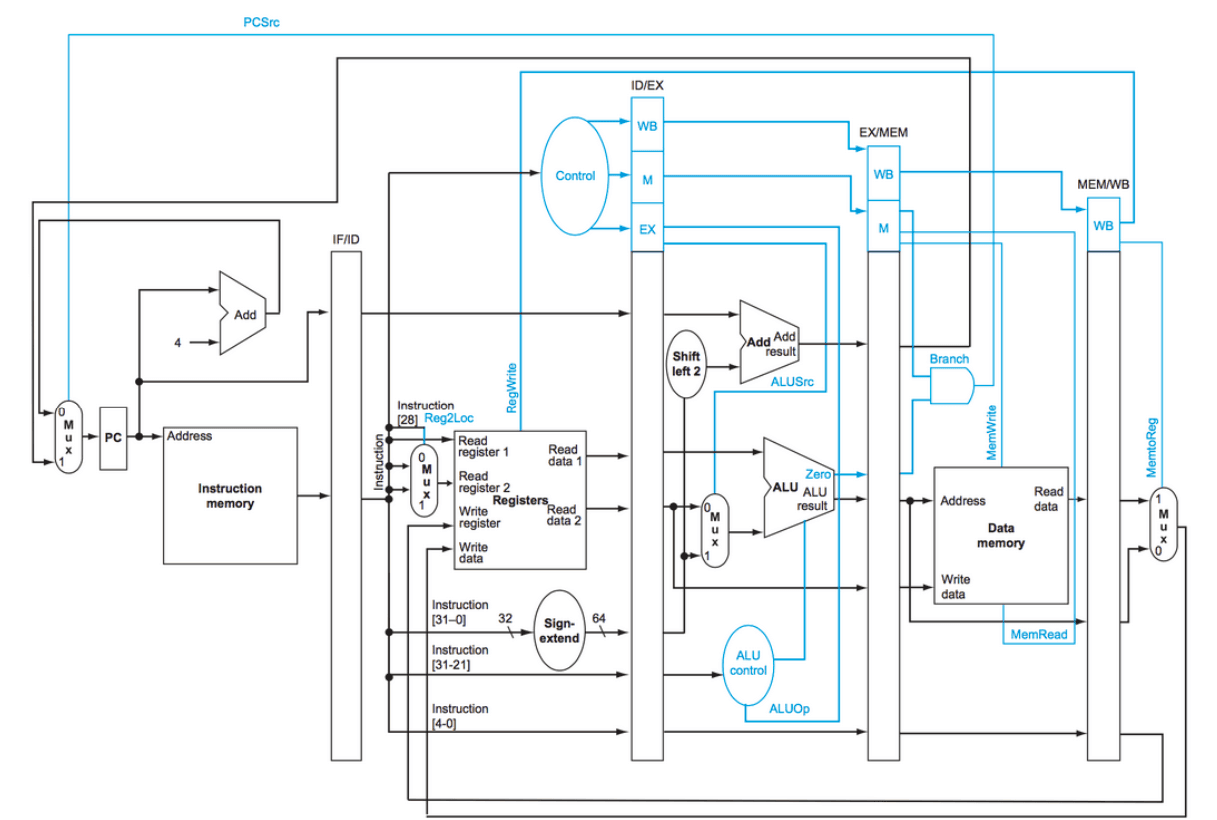
The pipeline is split into five distinct stages, each doing its own job on a different instruction every clock cycle. Between each stage, I added pipeline registers (IF/ID, ID/EX, EX/MEM, MEM/WB) that act like temporary storage, holding onto all the data and control signals needed for the next stage. This way, while one instruction is being decoded, another is being fetched, and yet another is executing in the ALU, all at the same time. It's like an assembly line, but for instructions.
| Stage | Name | Function |
|---|---|---|
| IF | Instruction Fetch | Grab the next instruction from instruction memory using the program counter |
| ID | Instruction Decode | Break down the instruction, read source registers, and prepare immediate values |
| EX | Execute | Perform ALU operations or calculate branch target addresses |
| MEM | Memory Access | Read from or write to data memory for load/store instructions |
| WB | Write Back | Write the result back into the destination register |
Handling Data Hazards and Forwarding
One of the coolest parts of this project was solving the data hazard problem. When you have instructions running in parallel, sometimes an instruction needs data that the previous instruction just calculated, but that result hasn't made it back to the register file yet. You can't just wait around, that defeats the whole purpose of pipelining.
Data Forwarding
Instead of waiting, I built forwarding paths that grab results directly from where they're being computed. If the ALU just finished an operation and the next instruction needs that result, we can forward it straight from the EX/MEM pipeline register. Same thing if the data is coming from memory, we can forward from MEM/WB. For store instructions, I added a special forwarding path so we can write the correct value to memory even if it was just computed.
Load-Use Hazard Detection
Forwarding works great, but there's one case where you just have to wait: when you load data from memory and the very next instruction needs it. Memory reads take a full cycle, so there's nothing to forward yet. My hazard detection unit watches for this pattern, if it sees a load instruction followed by an instruction that uses that loaded value, it freezes the pipeline for one cycle. The program counter stops incrementing, the IF/ID register holds its value, and I inject a "bubble" (basically a no-op) into the pipeline by zeroing out the control signals. It's not ideal, but it's the only way to guarantee correctness.
Branch Instructions
Branches add another layer of complexity. For unconditional branches (B), we always jump. For conditional branches (CBZ, CBNZ), we check if the register is zero or not. The branch decision happens in the EX stage, where we calculate the target address and evaluate the condition. If the branch is taken, the PCSrc signal routes the new address back to the program counter, and we flush the incorrectly fetched instructions. It's not perfect, we still waste a couple cycles on mispredicted branches, but it works.
Instruction Set Implementation
I implemented the core instruction types that make up most programs. Each type has its own encoding format and requires different control signals to execute properly.
| Type | Instructions | Description |
|---|---|---|
| R-Type | ADD, SUB, AND, ORR | Operations between two registers, result goes to a third |
| I-Type | ADDI, SUBI, ANDI, ORRI, LSL, LSR | Operations with immediate values, plus logical shifts |
| D-Type | LDUR, STUR | Load and store with base register plus offset addressing |
| Branch | B, CBZ, CBNZ | Jump to different addresses, with optional zero/non-zero conditions |
Testing and Debugging
Testing a processor is way different from testing software. You can't just print debug statements, you need to watch signals change over time. I wrote testbenches that loaded programs into instruction memory, then used GHDL to simulate the VHDL code and GTKWave to visualize the waveforms. I could see exactly when each instruction entered each pipeline stage, watch register values change, observe memory accesses, and verify that forwarding was working correctly. When something went wrong, I'd zoom into the waveform at that exact clock cycle and trace backwards to find the bug. It was tedious, but there's something satisfying about seeing your processor execute instructions correctly, cycle by cycle.
What I Learned
Building Complexity from Simplicity
The biggest realization was that processors aren't magic, they're just a bunch of simple components wired together cleverly. A multiplexer here, an adder there, some registers to hold state, and control logic to orchestrate it all. Individually, each piece is straightforward. But when you connect them in the right way, you get something that can execute billions of instructions per second. Understanding how those pieces fit together, how data flows through the pipeline, and how hazards get resolved, made computers feel less mysterious and more like elegant engineering. Now when I write code, I have a much better intuition for what's actually happening when it runs.